
Linux in your smartphone
Walid: hello and welcome to Projets Libres, the podcast of LinuxFr.org that talks about free software, open data and the digital commons. I’m Walid Nouh and today, I’m delighted because with me I have Arnaud Ferraris who is the main developer and founder of Mobian, a Linux distribution on smartphones and with him we’re going to talk about Linux on your phones.
It’s the continuation of the four other episodes we made, including the last one with Fla from Framasoft which introduces issues related to privacy and now we go a little more into the Linux part that we introduced and so with Arnaud we are going to make an overview. We will explain to you where we are, the different possibilities you have, the problems encountered, what to expect in the future or not. That’s it, so it’s going to be very nice. Welcome Arnaud, welcome to the Projets Libres podcast.
Arnaud: Hello Walid and thank you for having me.
Presentation of Arnaud
Walid: Well listen, to begin with, ritual question, I’m going to ask you to introduce yourself please. Can you explain to us who you are, what do you do for a living first?
Arnaud: My name is Arnaud and I’m generally an embedded software engineer under Linux. Generally speaking, let’s say that I’m a very high-level geek and as I finally made my orientations, my career choices, I ended up moving towards embedded software and by chance I was able to find work in the field of embedded Linux.
And since then, it goes back to 2013, so it’s been 13 years already and since then I’ve continued on this path. And currently, I’m working at Collabora for a wide variety of clients, it can be Google, Mediatek and others, where I do fairly low-level development, at the bootloader and kernel level for Linux systems.
Walid: How did you get into free software? How did it go? And when was it?
Arnaud: So it was a very long story, it started in 99 or 2000, if I remember correctly. In fact, at the time, I was a very young student in the first year of university, after a preparatory course that had not necessarily gone very well. And I was already passionate about computers, but let’s say from afar. I’ve had computers since I was 8 or 9 years old, but I used them as an improved game console. Arriving at the end of adolescence, beginning of adulthood, I wanted to go further, to understand how things worked, to learn programming. I had some free time, precisely, during this first year of university, so I wanted to get into it and I was on Windows. The possibilities for a development environment were things like Microsoft’s Visual C++. There was also Borland C++ Builder. But we were only on proprietary software and of course paid.
I ended up hearing about Linux and free software from the point of view of being free. I started to take an interest in it, to install a first distro. And in the end, I tested a whole bunch of distributions pretty quickly. The distributions of the time, so Red Hat, SUSE that already existed, Mandrake that has disappeared, a few others that are just as historical. So, there you go, I finally started to get passionate about Linux from a purely technical, user point of view.
I then migrated to Linux From Scratch, just to really tinker with my system from A to Z. In doing so, finally, I dove into the ecosystem that existed around Linux, the free software ecosystem in general. So, I gradually adhered to the philosophy and the practices and issues related to it, without being an exclusive user of free software at first. I was, as they say, a pragmatist. And in particular, for a whole period from, I think, 2003 to 2010, I used macOS, which at the time was a pretty revolutionary system because it was a Unix base, a system with which you could tinker, in which you could go rummaging around and configure a little bit to your own way to a certain extent. Of course, we didn’t have the degree of customization that we had under Linux, but since I wasn’t a student anymore at that time and I also had less time to devote to it, it was a good in-between. And little by little, eventually, Apple started shutting down the system to a point where it had become too much for me. I wanted to regain my freedom in a way and I came back to Linux, which I haven’t left since. And I’ve been lucky enough for ten years now to use Linux exclusively at work as well. So the more it goes on, the more I only use free software and only Linux-based systems.
Walid: So you didn’t mention it, but you’re the founder of Mobian. You’re in the Debian ecosystem too. Are you a Debian developer?
Arnaud: So, I’m a Debian developer, but in the end, it came thanks to Mobian rather than the other way around. I mentioned my Linux from scratch transition, in the early 2000s. When I wanted something a little more stable and a little more accomplished, I ended up retesting different distributions. This was around the time Debian version 3 was released, around 2002-2003 from memory. And finally, I stopped at Debian which was basically much less complicated to use than what people were saying. Maybe also because I had spent two years tinkering with shell scripts, package installs without packages on my PC. But in any case, it seemed to me much more accessible than what people were saying. And a system on the whole extremely well done, including the package manager, apt, which, at the time, was quite revolutionary. RPM-based distributions, like Red Hat or Mandrake at the time, didn’t have them yet, or they were really in the early stages.
The package manager that could simply download a package with all its dependencies from the Internet and install it with a single command on its system. So since 2003, I would say, I have been using Debian as a reference Linux distribution. And over time, every time I’ve had a new machine to set up, whether it’s a small server at home, a media center or whatever, my immediate reflex has always been “ok, can I install Debian on it and how?”.
What is Linux on mobile?
Walid: That brings us to the first part, which is why put Linux on a smartphone? First of all, can you explain what we call Linux on a smartphone, on a mobile? Please.
Arnaud: There are several ways to run Linux on a phone. The first will be, for example, on Android, to use a virtual machine that runs a Linux. The second is something that is used by other mobile-oriented distributions like Ubuntu Touch for example, where we finally take the kernel and the low-level services of Android and on top of that, we run a system closer to a classic Linux distribution with glibc, so the libc of the GNU project in general and all the utilities we will be used to. And the third way to do it, which is the one I’m talking about when I talk about Linux on mobile, globally this acceptance that is widespread in the mobile Linux community, is simply to run a Linux kernel derived from the mainline kernel, so the kernel maintained by Torvalds, with quite few patches on top, a few dozen, or even a few hundred in the worst case. It may seem like a lot, but we’ll probably come to it later, it’s something really very small in the end. And so run a standard Linux kernel that doesn’t come from Android, that isn’t provided by an Android phone manufacturer, with all the utilities and userspace applications that you have in a classic distribution like Debian or Fedora.
Walid: So I was saying there, when we talk about Linux distribution on a smartphone, on a mobile phone, we’re actually talking about porting an existing distribution to a phone. For people who want to know the difference between a phone and a computer, we talk about the episode with Fla from Framasoft, where we do a whole section on what is the difference between a phone and a computer, that’s in terms of components, in terms of ecosystems, etc.
Arnaud: The idea is indeed to port existing distributions like Debian, Fedora or even Arch. So there are several projects in this direction, by finally benefiting from all the work that is already done by the distributions themselves on software packaging, on dependency management, on the compilation infrastructure and all the tools that we will have to finally create the distribution itself, while adapting it to the specificities of mobile, which are basically not that different from computers, let’s say at the elementary level.
And the difference is less and less important, especially with machines like laptops based on ARM processors, where we find exactly the same problems as what we have in mobile. That is to say already a processor with an ARM architecture, which is a different architecture from the usual PCs, but above all the fact that we have a certain number of peripherals integrated into the processor. This includes the graphics card, but also the sound card sometimes, a whole bunch of blocks that need a specific driver. And where it’s complicated is that for a very long time, mobile processor manufacturers didn’t play the game of upstreaming, i.e. to transfer their modifications to the reference Linux kernel.
Fortunately, things are changing, especially at Qualcomm, for example, we have a lot of work being done to ensure that the most high-end processors are supported by [Linus] Torvalds‘ Linux kernel, simply because it gives them a competitive advantage as well. This allows them to highlight this to their professional buyers in particular, but also in the IoT and automotive sectors. As much as a phone manufacturer will want people to renew their phone every two years, and so after a year or two, we stop supporting this model, because anyway, we want people to replace it, we simply want to sell. In the automotive industry, this is something that is not an option. A car, the vocation has remained in working order for at least ten years, and a car manufacturer will specifically ask the manufacturer of the processor to provide software support for a period of time that is still quite long, and extremely long, even if we take the lifespan of phones as a reference.
Arnaud Ferraris
So there is a change, I talked about Qualcomm, Mediatek which is the other big manufacturer of chips for phones, is also trying to attack the IoT and automotive markets, and suddenly finds itself facing the same problems, and also has to adapt by participating in the upstreaming of a certain number of processors. So things on that side are changing.
But beyond the processor, there are also all the physical devices that will be connected. The screen in general needs a specific driver. We are also in an architecture that does not use the mechanisms that we have on X86, such as UEFI at the BIOS level, ACPI, especially energy management, but also for, in fact we have ACPI tables, which are data tables, which list the hardware present on a computer. And so that’s done by the BIOS, it’s available to the operating system, and so on a PC, Windows and Linux will look in these ACPI tables to say I have such and such hardware available on the machine, so I’m going to use this driver for this element.
This is something that, as a general rule, is not present on ARM machines, so you have to use other mechanisms, in this case the Device Tree, which is initially a text file that actually describes the hardware in tree form, but it implies having a bootloader, so in a way a BIOS per machine. On mobile phones, this bootloader does not provide an ACPI table, so we are forced to find another way and therefore finally embed the Device Tree with the kernel to have a kernel image, let’s say, per machine. So that’s part of the difficulties we have with phones compared to computers.
Walid: It’s a lot of work.
Arnaud: It does indeed do a lot of work, and I would even say that it’s the main part of the job to port a Linux distribution to mobile. Most major distributions now, especially with the arrival of ARM laptops, generate ARM64 packages, so binary packages that can be executed on these machines. Very clearly, the packages that are intended for an ARM laptop can be used as is on a mobile phone of the same architecture. There is no difference. The only variation, the only software element that will vary between one machine and another, whatever its form factor, let’s say, is going to be the kernel itself, the kernel binary, and in particular the device tree. But as a result, for example at the Mobian level, we only have about twenty Debian packages that are exclusively part of Mobian. Everything else comes directly from the Debian archives, and we either keep them directly in Debian, or we finally rely on the work of other Debian developers to take over these software, and we will use it in the Debian FTP when updating or building the system.
Why put Linux on a smartphone?
Walid: A more fundamental question, the question is why would we want to be able to put Linux on a smartphone? What makes an Android smartphone, you want to change to put Linux on it? What would we gain by doing that? I should have started with this question.
Arnaud: It does depend a lot on the users. As far as I’m concerned, the number one reason is simply because I can, because it’s fun, and because it finally allows me to do what I do with all my machines. As I mentioned earlier, I use Debian on all my PCs, servers, etc. And so why not on my phone too? In the end, it’s never just a computer in a pocket format. That’s what personal motivation is. And so this can be one of the reasons to use Linux on mobile.
Another reason is the total control we will have over the system. Whether with Apple or with Google, we are always in a situation where the distributor, the main developer, or at least the company that manages the operating system, controls the low-level elements. On Android, apart from the few completely open source projects that exist, and which on the whole provide a completely open source base, we will always have proprietary services, and proprietary applications that will run in the background, and of which we don’t know what they do. We have a lot of leaks, in quotes, of data. I put leaks in quotation marks because that’s the normal operation, in fact, of the app. The normal way Android works is to send the phone’s GPS location to Google at any time. And finally, in these operating systems, everything is done to collect as much data as possible. A mobile OS is above all a vacuum cleaner for personal data. So, installing a purely Linux system on mobile is already getting rid of that. It means keeping control of your data and keeping control of your IT. And so, as a corollary, when you are also worried about the respect of your privacy, it is the rather ultimate way to protect your privacy.
Arnaud Ferraris
Walid: Do you see any other additional reasons that would push you to do that? I think in particular, one of the main problems we have with Android is that in fact, the supplier of your phone, it provides you with an Android phone with a version of the Linux kernel. And this version of Linux, it doesn’t move much during the life of the phone, maybe one or two updates, only in full?
Arnaud: So, the up-to-date Linux kernel is one of the arguments, especially in terms of security, because typically, the Android kernels provided by the manufacturers, already when the phone comes out, it’s a kernel that is several years old, let’s say at least two to three years. We’re talking about a kernel that has long-term support, which will be modified by Google to add a number of elements specific to Android, then by the processor manufacturer to add chip support, then finally by the phone manufacturer itself to add the missing drivers, whether for example for the screen, audio amplifiers, fingerprint reader, etc. So, we already end up with a Linux kernel that is quite old as soon as the phone is released. Then, it will be updated in general on the same branch of the Linux kernel. So, for example, right now, we’re going to have phones that may be sold with a 5.4 or 5.10 core. And we’re going to stay with that version. We’re just going to take the updates that are from the stable kernel, we’re going to say from the LTS kernel, so Long Term Support of Linux. But this LTS version also has an end-of-life date. And after a while, we end up having no support at all from the Linux community for this kernel. Typically, at the moment, the latest and oldest LTS kernel is 5.10. And I think the support is going to stop at 5.10 like 5.15. Support stops at the end of this year.
So, this means that if you already have a phone with a 5.4 kernel or older, there is already not a single security patch that has been released for that kernel. So, this already poses a potential security problem. In addition, since these are kernels that are very heavily modified, we are talking about several million lines of code added by Google and the various manufacturers, these are kernels that we simply cannot, as a community player, update to a more recent version of Linux. It would be a colossal job. It’s completely out of reach for independent and volunteer developers like us.
So, in the mobile Linux world, we try to follow the evolution of the kernel, to have a limited number of patches on top of the mainline kernel. This is usually a few tens of thousands of lines of code compared to the few million that the manufacturer provides. And as a result, it is possible for a single developer to maintain a kernel and keep it up to date with the latest version of the official Linux kernel, without too much difficulty. I know that typically, in general, at the Mobian level, when you go to update a kernel, depending on the experience of the developer, who must obviously be familiar with the kernel, but without being an expert either. And so, depending on the developer’s experience, it’s going to take 2 to 6 hours to make a major version jump, for example from 6.17 to 6.18.
Walid: Which kernel do you run, for example, on your phone?
Arnaud: I have a 6.18. OK. Knowing that my phone, in this case, is a Google Pixel 3a, which was released many years ago [2019] and has not been supported by Google for a very long time.
Walid: Another point that seems obvious, but that must be said anyway, is that it also allows you to take old phones and extend their life too.
Arnaud: Absolutely, we finally realize that phones that were released 6 or 7 years ago are perfectly usable under Linux. So, provided of course that developers have done the work of porting the mainline Linux kernel to this machine, of course. But in terms of speed and performance as a general rule, these are machines that are perfectly usable. And one of the reference phones of the Linux mobile community is the OnePlus 6 which is at least 8 years old, it seems to me, if not more.
The challenges of using a Linux phone on a daily basis
Walid: 2018. I have a OnePlus 6T, it’s a quad-core 8GB of RAM and it works great. With a 6.17 kernel and it works really very well. Okay, so that’s super interesting. Listeners might say, okay, that’s great, I’m going to switch to a Linux on mobile. Because it looks really great. But in fact, what are the challenges of using Linux on mobile? Basically, what are the points that will be critical in relation to the use of an Android phone if you want to use a Linux smartphone on a daily basis?
Arnaud: So, there will be two aspects. The first will be the support of the equipment. As the Linux support for these machines is developed entirely by a community of volunteer developers for the most part, the hardware support is not necessarily at the top. And the fact that each machine usually has a different screen, different camera sensors, etc. does not make things easier. Typically, camera support in Linux mobile is really in its infancy. We have relatively few machines on which we can use the cameras and even fewer machines that would give us photos of acceptable quality. So that’s already a first point since the use of a phone as a camera has become, let’s say, commonplace. At least in the world of Android, iOS. But in the Linux world, that’s really not the case. There are a few phones that allow you to take acceptable photos, but they are really very rare and we can’t consider them to be a main camera. So, this is already a first blocking point.
But the point that is the most problematic, let’s say, is that under Linux, by default, we don’t have all the proprietary Android applications. So, since users in general are used to having access to a whole bunch of apps, to name just one that I personally confront most often, is WhatsApp. Almost everyone, in the end, will assume that we have or can have WhatsApp. This is something that is not true when you have a Linux phone. So, there are possibilities to use these applications. It’s still quite risky, not rock-solid. And so, depending on how you use your phone, it can be very complicated to keep in touch with your immediate entourage, with your loved ones, and then to finally find alternatives to all these proprietary applications, since the applications themselves, sometimes, are not very complicated, but they give access to a network that is, it, proprietary, where they use an API, therefore a programming interface, communication between the phone and the servers of the application developer, which are proprietary, which cannot, in the end, be easily implemented under Linux in an open source application.
Walid: the Signal messaging client, of an instant message, there is no ARM version?
Arnaud: Absolutely, and the case of Signal is very interesting, since it’s an open source application. But the policy of the owners, in a way, of Signal, is not to accept customers developed by others on their network. First, they don’t provide an ARM Linux application for Signal: they provide libraries that allow you to interface with their network. But, at the moment, they do not allow any Linux machine to be used as a primary client for Signal. On Signal, we’re going to have a main machine, a primary machine, which is going to have all the security keys. And behind that, we will be able to authorize other machines, which can be Linux PCs or others. And so, for Signal, you can’t have a Linux as a primary machine. It can evolve, but it requires having an Android or iOS machine as the primary phone to then be able to authorize your Linux phone to access Signal.
Walid: For that, it was a Signal example, but there are plenty of others, examples. We will come to this later, I think, on the application part.
The Camera Problem in Linux
Walid: The camera is something very interesting, because in fact, the sensor itself, it gives you photos, but then, there is a whole software package that allows you to retouch the photo and make sure that you have good quality photos. And that, in fact, all this software part, it’s not open source, we don’t have access to it, which means that, among other things, under Linux, at best, you have the photos of the photo sensor.
Arnaud: Absolutely.
And in the context of everything that is photo, it goes even further in the sense that, since it’s a fairly sensitive element in terms of intellectual property, they don’t want to release any code on this subject. And we finally find ourselves in a case where Google has set up a specific subsystem in the Linux kernel that allows you to use drivers in user space, so they are not part of the kernel. So even Android phones that have a Linux-based kernel, which must therefore be made available by the manufacturer, the kernel sources do not contain anything related to the elements that allow you to take photos.
Arnaud Ferraris
So it’s going to be the drivers, indeed, of the camera sensors, but also on the processor, the communication interface that is used with the sensor, and especially the ISP, so it’s Image Signal Processor, so it’s a hardware block in the phone’s processor, which simply does image processing, and which implements features such as automatic photo exposure, autofocus, white balance, etc. And so even these ISP blocks don’t have an open source driver for the most part, so things are changing little by little, but we end up with something that is only distributed in binary form in the user space, and finally, it runs on Linux, of course, but we can’t even have the beginning of a source on it.
Calling and VoLTE
Walid: And there’s one last thing you didn’t mention either, it’s the whole voice part for calling and receiving calls, which is also potentially quite problematic on Linux.
Arnaud: Overall, it’s more a lack of familiarity of developers with audio systems than a real difficulty put in place by the manufacturer or whatever. In general, the audio drivers that we will find in the downstream kernels, from Android manufacturers, can be used to understand how it works and reimplement it as a mainline driver. Audio under Linux is still quite complex, and in particular, we have the whole Alsa (Advanced Linux Sound Architecture) part behind it, with in particular configurations by machine to indicate who is the speaker, what is the microphone, etc., how everything should be organized.
Walid: So, wait, Alsa?
Arnaud: Alsa, it essentially represents the Linux kernel API to user space, but also a number of libraries and utilities in user space to communicate with the kernel. So, it’s a pretty large system, and on which the whole audio stack behind it is based, Pulse and Pipewire, will use the Alsa APIs to communicate with the kernel, etc. As a result, all this makes audio on Linux really complex.
In addition, audio in itself is a fairly basic concept, but we realize that there are a lot of difficulties and different use cases that will ultimately make the implementation very complicated. So, at the most basic level, we have developers who are quite competent, let’s say, and very good at kernel programming, etc., but who are not necessarily familiar with digital audio. That’s a first obstacle, but we manage to get over it, we manage to find solutions, and little by little, to arrive at a relatively decent level of support.
One point, however, that is more problematic is the current deployment of VoLTE, i.e. Voice over LTE, i.e. the voice no longer passes through the usual mechanisms of the mobile phone, 2G, 3G, well since the beginnings of GSM, but is transported in the form of data in 4G or 5G. So the problem is that it’s quite proprietary: we don’t have a public specification on the subject, and I want to say that even when we have a public specification in the mobile world, as a general rule, it’s not necessarily something useful, since operators, in general, will do all kinds of things that are not completely out of scope, and therefore have non-standard interfaces.
Arnaud Ferraris
A very good example of all this is MMS or visual voicemail, where each operator, in the end, will add his little sauce and we will not be able to make a truly universal application for it. And so, we have the same problem with VoLTE, which means that it depends on the operators’ implementations. As a result, you need to have software support, knowing that the modem is usually integrated into the chip, so you don’t have a lot of leeway on what you can or want to do with it.
And with the planned shutdown of 3G, and therefore the generalization of VoLTE on all mobile infrastructures, we do have something potentially problematic at this level. So, there are efforts, especially OpenIMSD or 81Voltd, I think. Finally, there are a few software projects that aim to allow the use of VoLTE from a Linux machine. For the moment, it remains very random, and for some users, it works, for others, it doesn’t. Sometimes, you have to reflash an Android system to finally be able to configure it for VoLTE, and afterwards, reinstall a Linux that will use the previously established configuration. But in any case, we don’t have a single, universal solution on this subject.
The interest of Halium vs using a mainline kernel
Walid: I would like us to come now, for 5 minutes, to the different approaches. We talked about it very quickly, we also talked about it a little bit with Fla in the previous episode. These are the different approaches to Linux distributions. You touched on two words earlier in the introduction: either we start with a Linux kernel, and on top of it, we will make its distribution, or we start with an Android kernel, and we add the whole layer of Linux users on top. Which is called Halium, from memory.
Arnaud: Absolutely.
Walid: What do you think are the pros and cons of Halium compared to using a standard Linux kernel? Why would Halium be used?
Arnaud: So, the advantage of Halium, and this is undeniable, is that it allows you to get to a complete hardware support very quickly. Since we use the Android kernel with the low-level layers of Android as well, what we call Hardware Abstraction Layer, so abbreviation AL, and so it gives Halium behind.
Finally, we use the proprietary drivers that are provided by the phone manufacturer directly, with the kernel that he has concocted himself and which is optimized for this machine. And as a result, we’re going to have quite reasonable camera support, with the possibility of having much better quality images than what we have with a “pure Linux”. We’re going to have fingerprint sensor support, for example. Audio is not a problem. In general, VoLTE, which I mentioned earlier, also works in the same way as it does on Android. Halium allows you to quickly have a functional Linux system and a fairly complete support of the phone’s hardware for a given machine.
Walid: Sorry, do you know where Halium comes from? Who started working on this?
Arnaud: Well, it seems to me that it’s SailfishOS. It’s something, I don’t know if it’s from the time before Sailfish, so Meego, the former Nokia employees, but it seems to me that Sailfish was very involved in it and that they developed libhybris, which is ultimately the basis of Halium. But I’m not sure at all, it would be worth digging a little more into the history [the Jolla company hired the original developer of libhybris].
Walid: And you know which distribution decided to use Halium?
Arnaud: yes, the biggest one will be Ubuntu Touch in the end. It’s also a pretty logical decision on their part, let’s say, in the sense that Ubuntu Touch was originally launched by Canonical. So it’s a project of a company that seeks to have a result, a product to put on the market. And already at the time, phone manufacturers provided a phone, even manufacturers, let’s say OEMs, could provide an Android phone and then it was up to the sponsors to adapt the Android, etc. But they never provided a phone with a Mainline Linux kernel. So as a company, the logical answer, if you want to bring a Linux phone to market, is to take that Android phone, behind it, add Halium and put a Linux on top of it. So Ubuntu Touch being, the current version being an offshoot of that, they finally stayed on the operating mode where we use Halium and it still allows them to support a very large number of phones with a level of hardware support for each one which is from the point of view of a Mainline Linux distribution which is quite impressive.
Walid: So we have SailfishOS, we have Ubuntu Touch, these are the two big distributions they use.
Arnaud: Absolutely.
Which hardware should you turn to to have a proper Linux experience?
Walid: ok. Let’s say, I’m a user, I’m interested in testing Linux on mobile. The first thing is to find the right platform, to find the right phone. When I looked for my main phone, I didn’t want to touch it at first. And my backup phones, they weren’t necessarily supported. So I looked at the supports on the postmarketOS sites, Ubuntu Touch, etc. And indeed, from all this, in a somewhat empirical way, I came to say to myself “ok, well, a Oneplus 6 or 6T, it looks good”. But overall, what can we say to ourselves if we want to do Linux on mobile and have a decent experience? Which platform do you turn to?
Arnaud: That’s a very good question. I would say that indeed, what you mentioned, so One plus 6 and 6T, it’s part of the reference machines.
Walid: why is it part of it? Is it the processor support that is good? Why have we come to see people everywhere who say “I have a One plus 6 or 6T?
Arnaud: So, in fact, the Oneplus 6 is based on a Snapdragon 845 processor from Qualcomm. And it turns out that Qualcomm had released, at the time when this processor was their top of the range, a development board, Dragon Board 845C, if I’m not talking nonsense. And so, since it was a development board that was intended to be a reference board for all types of developers, in order to also promote Qualcomm processors to embedded developers, more traditional, etc., they commissioned Linaro to finally support this development board, and therefore this processor, in the mainline kernel. So, what makes the Oneplus 6 so popular is on the one hand that they use a processor that already had hardware support in the Linux kernel that was existing, and of fairly good quality.
Then, it was chance that some developers had this phone. They thought: “the processor is already supported, what can we do on our side to really use it as a phone?” And there is a community that has been created around it. And finally, it laid the foundation for community support for Qualcomm processors, at least Qualcomm-based phones. Because behind it, there were a number of other developers who were interested in it, who realized that “oh well, the processor I have is not an 845, but it is still derived from it”. And finally Qualcomm, like all processor manufacturers in general, reuses hardware blocks from one processor to another. They’re going to add hearts, they’re going to make them faster, they’re going to change one or two things. But it’s always incremental variations on the same product. And from the 845 which was well supported, we were able to have support for other processors, the Snapdragon 670 for example, which is used in the 3A and 3A XL pixels, on the other hand, we have Fairphone which released the Fairphone 5 with an IoT-oriented processor, but which is a derivative of a Qualcomm processor that was released a few years ago, the 7C Gen 2 I think, which was expected to be integrated into Chromebooks. And so Google, at least the Chrome OS division at the time, required the processor’s manufacturers to implement upstream support for the processor, if it wanted to have a chance of being integrated into Chromebooks.
So the upstreaming work for the Snapdragon 7C Gen 2 has been done as well. And since the processor of the Fairphone 5, just like the Shift 8 for that matter, is based on the same processor, just under a different name, it allows to have a hardware support that is already relatively advanced for these machines. And finally, we find ourselves in a case where more and more basic processors, at least at Qualcomm, are supported in the mainline core. More and more developers are interested in it, decide to implement the drivers for the touch screen and two or three other things, it becomes almost exponential in terms of the number of machines supported and the hardware architecture supported by the mainline kernel.
Walid: I’ll put in the transcript links to, I think, this year’s FOSDEM conference on the support of, I don’t remember which version, of Qualcomm processor, but there’s a whole technical conf on this that’s quite interesting. I will put the links in the transcript.
Walid: The case of Fairphone is interesting because they already have Luca [Weiss], one of their developers, who is one of the core developers of PostmarketOS, which we’ll talk about later. He does a job, I think it’s not necessarily the only one on this, porting Fairphones on it. So that too, even if it’s not, that also certainly aims to have proper support for these phones which, on top of that, are here to last for a while.
Arnaud: Absolutely, on the Fairphone side, we do have a long-term support vision, and that potentially includes, it’s more at the experimental stage on their side, but it potentially includes the use of a mainline Linux kernel to overcome the maintenance difficulties of Qualcomm manufacturers’ kernels, etc. They have a real desire for this, and on top of that, indeed, the fact that Lucas is a Postmarket OS developer and employed by Fairphone at the same time, allows for even better support, at least potentially better, since as a Fairphone employee, Lucas has access to technical documentation and electronic schematics that are generally not available to developers in the community.
Walid: yes, what I meant is that in fact, from the moment you have done the work of the hardware support once and it is put into the mainline Linux kernel, afterwards, it’s won, you know.
Arnaud:
Absolutely, once it’s upstream, it’s something that no longer needs to be done, and besides, within the mobile community, almost everyone communicates. So, in the end, what one is going to do on one machine will be able to be, on the one hand, easily ported to another distribution, for example, but also easily spread to other machines. And camera support, in this case, is a very good example. In the sense that we have a certain number of developers who were breaking their teeth on it, until the day when one of them found a solution that worked on his machine, that he published, the others went to look at it, were inspired by it, and we find ourselves at a point where, three years ago, we were almost all convinced that we would never have camera support on phones based on the Qualcomm chip. And now, almost all new phones supported on Linux gain camera support before audio support.
Arnaud Ferraris
So, there is a very rapid and always very positive evolution, which is sown on the entire ecosystem as soon as we have found a solution that works on a machine or a family of machines.
Available office environments
Walid: If we now move on to one of the layers above, i.e. the desktop environment layer, what will we find as a desktop environment, as a different type of office environment? Will we find the same desktop environments as we find on a Linux desktop, but mobile version? Will we find others that are specific? What can you tell us about this subject?
Arnaud: It actually reproduces quite well what we have on more classic computers, in the sense that we have environments that are based on KDE technologies, others that are based on GNOME technologies, and others that are completely different. We won’t have exactly the same environments, but in any case, we’ll have something very similar in the sense that the underlying technologies are the same anyway.
And so, for example, on the one hand, we’re going to have [KDE] Plasma Mobile, which is a mobile version of Plasma Desktop. Most of the software bricks are identical, but we’ll have small differences, such as the composer or the application launcher, which are really made for mobile, because the ergonomics are very different. We only have a touch screen available, no keyboard or mouse. So, there are ergonomic choices that are different. But in the end, most of the software bricks will be identical.
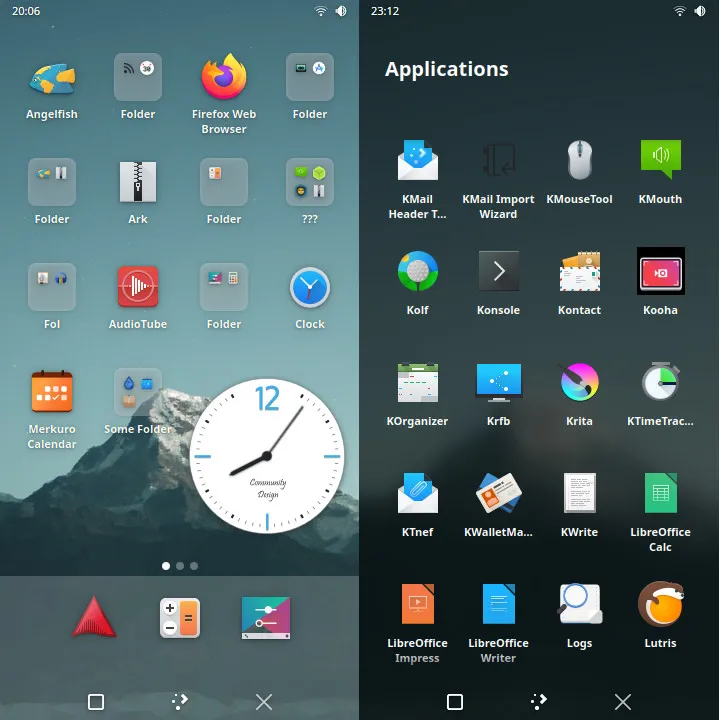
And in the same way, we’re going to have the GNOME counterpart. So here, for once, we have two environments. Phosh, which uses GNOME technologies, especially background processes, but the visual part, the composer, is based on Wayland. The composer and the graphic environment, generally speaking, are specific projects, really dedicated to mobile. GNOME Mobile is for the moment, a fork of GNOME Shell, with a desire on the part of the developers, to gradually integrate their modifications into GNOME Shell, and therefore to ensure that the GNOME for desktop can be installed as is on a mobile, and work, finally adapt in terms of operation, and provide a usable touch interface [see this FOSDEM 2026 conference].
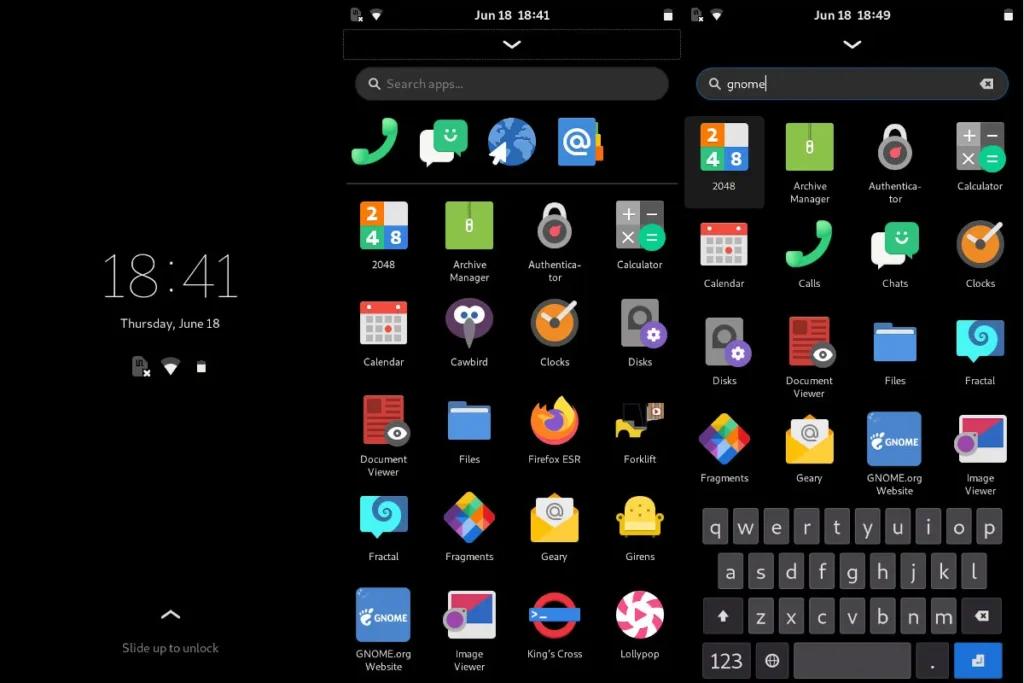
So we already have the two usual large desktop environments, which are available, in one form or another, on mobile. And next to that, we’re going to have the outsiders, I’m thinking in particular of SXMO, which is a completely different project, which ultimately replicates, the user experience, at least which is intended to replicate, the user experience, of the Tiling Window Manager, so i3, Sway and company, with a rather extreme use, movements, to 1, 2, 3, 4 fingers, on the screen, for different functionalities.
We also have an environment, which is a little different, which is Lomiri : it’s the graphical environment, Ubuntu Touch, which is derived from Unity, which existed before on Ubuntu. So there you have it, we have the main, the main mobile environments.
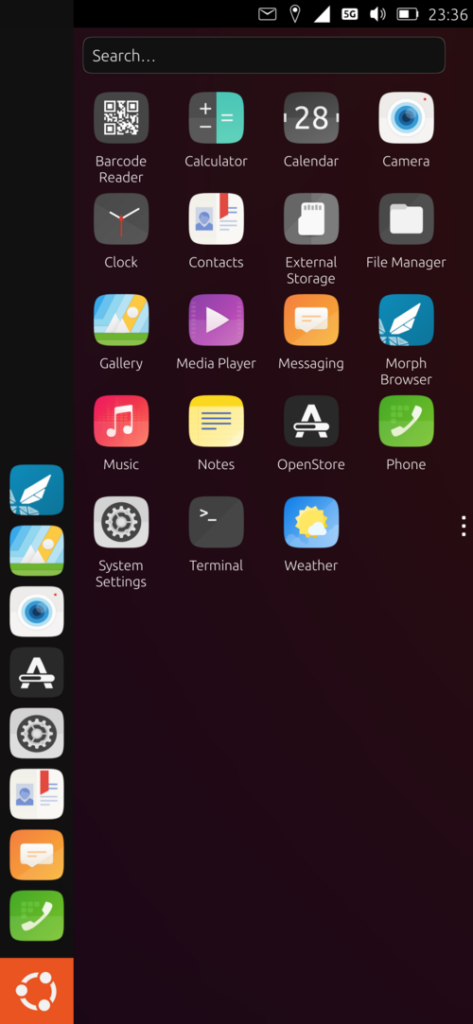
In general, users will often turn to Plasma Mobile, or Foch, depending on who comes from the GNOME ecosystem, or KDE.
Walid: I started with KDE Mobile, and then when I was talking to the people from PostmarketOS on their booth at FOSDEM, they told me “you should try Phosh anyway”. And indeed, I put Phosh, and it’s still, I find that it’s personally a little more accomplished, at least on the phone I have, it works really well for the time being. It’s really very usable.
Arnaud: Yes, I quite agree with that. That being said, there has been a lot of progress on the Mobile Plasma side in the last two years, I would say. Overall, when we were on Plasma version 5, there were a lot of bugs, and it was clearly not finished, but precisely, it was a lot because there were a lot of software bricks that were specific to mobile. Starting with Plasma 6, and in particular 6.2, they managed to integrate a number of these mobile-specific bricks into the basic Plasma Desktop, and so finally, it allows you to have more developers involved, more users, to fix bugs, so already to spot bugs more easily, and to fix them more easily too. So, indeed, I also have this experience of the fact that Phosh is much more accomplished and more usable on a daily basis. That said, for KDE die-hards, it’s worth noting that there’s a lot of progress that’s been made in the last couple of years, I think, without really using it recently, that Plasma Mobile is now at a stage where it can be used on a daily basis. I know that typically, one of Mobian’s contributors uses Plasma Mobile on a daily basis, and he’s the one who helps us the most to fix bugs and set up this support.
Walid: Do you use Phosh?
Arnaud: I’ve been using Phosh, yes, since I started on Linux Mobile, simply because, from the beginning, I’m more GNOME than KDE, but also because I started, let’s say, my Linux Mobile journey, almost six years, and at the time, there was really only Phosh that was usable.
Applications on Linux mobile
Walid: So, if we keep going upwards, and now, we’re talking about applications. What we said earlier is that even if, we’re going to talk about it later to explain that there are still some ways to do it, overall, we end up with a Linux. It’s not an Android, so by default, without doing anything, you can’t run Android apps.
Applications are a real issue, both because the Linux desktop suite provides applications, and therefore, you have to find the right one to do what you need. One of the examples is to listen to podcasts, I use Antennapod on Android and there is no Linux version. Eventually, I found out that there was GNOME Podcasts, which is very nice, and I started using GNOME Podcasts on the Linux phone.
So, there is work to be done on all the applications: I use KeepassXC, on my Linux desktop [and KeepassDX on Android]. So, the client for KeepassXC exists on Linux, but the interface is not at all suitable for the phone. So, we end up with a customer who is completely unusable. While searching, I came across Secret, which is another application, similar, which supports the Keepass format and works very well.
So, in fact, there are both applications that exist, others that can be used as is, but which are not at all adapted to mobile, others, like Signal, which do not exist. What can you tell us a little about that?
Arnaud: First of all, a first point is when we are on the environments, the two big environments that are KDE, GNOME, or suddenly, Plasma Mobile and Phosh on mobile, we still benefit from a fairly complete ecosystem, applications that are made to work together and that are highlighted: such and such an application corresponds to that, especially in the GNOME ecosystem that I know best. We have a client for podcasts as you mentioned, we have a calendar, we have a contact manager, etc. With a desire in addition to the developers’ desire to adapt their application to mobile.
So, we finally have a lot of basic applications that work right away, which are exactly the same applications as on desktop. My agenda is the same on my laptop and on my phone. For contacts, the same, the browser is the same thing. So, we already have a number of solutions and if we limit ourselves to the ecosystem, let’s say, of the graphic environment we use, we are already well taken in the hand to know which application to install and what should work on mobile. So, that’s already the first positive point on the subject.
Then, we’re going to have alternative applications, in a way, community for services that don’t offer native Linux applications or applications adapted to mobile. In the example of Signal, for example, we have a developer who works on Flare, an application in the GNOME ecosystem, which has, as I mentioned earlier, the disadvantage of not being able to be used as a primary client for Signal, at least for now. But, here’s the thing, things are not that bad and we have alternatives that are developing. For Matrix, which is widely used in the community, we’re going to have clients like Fractal, on the GNOME side or Nheko, I think, on the KDE side.
Walid: There’s Tuba for Mastodon.
Arnaud: Absolutely.
Walid: Tuba is very nice too. Yes.
Arnaud: you do have Tuba for Mastodon on the GNOME side and Tokodon, I think, on the KDE side. So, overall, compared to what we can do on a Linux desktop, we have more and more possibilities and applications that work on both and are therefore quite usable on mobile. In terms of heavier applications, there are also positive developments. I’m thinking in particular of LibreOffice. So, we have CollaboraOffice , which is a new application that uses these technologies and is also intended to be used on mobile. And so, as a little parenthesis, I work for Collabora. So, I promote, obviously, one of the company’s products, but it’s also because for me, it’s still an important application of a mobile phone.
Walid: I’ll put a link to the conference of one of your colleagues, I don’t know, at this year’s FOSDEM who talks about the work of porting CollaboraOffice. All this comes and the difficulties encountered, etc. It’s quite interesting. I tried it, indeed. There is still work to be done, but the prospects are quite interesting.
Arnaud: Two years ago, using a LibreOffice or similar on mobile on Linux mobile was a sweet dream. We’re not there yet, but right now, we’re getting closer. So, finally, the gap between what can be done between a Linux computer and a Linux mobile is getting smaller and smaller. After that, we actually have a whole number of applications that we have access to on proprietary OSes that are not available on Linux. So, in many cases, you have to moderate that because in the end, apps are often just a different way to access a website. For a certain number of services, we have a website behind it that can be used on desktop and therefore on mobile Linux as well. But we still have cases where, but if you don’t have a classic website, you simply can’t use the service on Linux. I typically take the example of self-service bicycles. A few years ago, you went to a terminal, bought a ticket on the terminal and took the bike. Now, it goes through a mobile app and so, in my city at least, in Toulouse [vélôToulouse], I can’t take a self-service bike except at certain terminals, which are very rare, in general, and not necessarily well equipped, which always provide this ticket printing service on demand. But for the rest, it’s a proprietary mobile app inaccessible to Linux users.
Waydroid, to have Android apps on your Linux phone
Walid: So, either we have a native Linux application whose interface is optimized for the mobile application that exists, or there is no service but the service we want to provide a web version and we can use the web version. The third possibility is another project called Waydroid which will allow you to run Android applications on your Linux, whether it’s your desktop or your phone.
Arnaud: Absolutely, yes. And you’re right to mention that Waydroid is also usable on a Linux desktop. In fact, the principle is quite simple. It’s about actually running an Android system in a Linux container. And so, in this container, we’re going to be able to install Android applications and, through certain mechanisms, we’re able to display the user interface and send commands to it under the Linux viewer which is usually under Wayland. And it’s done in a fairly transparent way. From memory, Waydroid uses a LineageOS container of a version that is not the latest. So, some apps might not work. there are also, in particular, Google Play services that are proprietary that are not available in this container. And so, as a result, we’re going to have, for example, banking applications that use a Google authentication mechanism that allows, in fact, to verify the integrity of the machine can’t work in Waydroid.
Walid: When you install Waydroid, at least, on my phone, that’s how it is. The first time you launch, it asks you which image you want to download. You have the naked image and you have the image with Google services. I use the naked version. And on the other hand, the problem is that in my case, for example, the container, it doesn’t have access to the camera and it doesn’t have access to the environment of my phone either by default without doing any manipulation. turn Android apps. It’s going pretty well. I was a little afraid for the drums, but in reality, it seems to be fine. But there are limitations.
Arnaud: Absolutely. And yes, indeed, Google Play services can run, let’s say, in this container. But it seems to me that some mechanisms, such as the machine’s authentication mechanism, I don’t know the name exactly, but it’s…
Walid: Isn’t it Play Protect [Android Integrity]? Not Play Protect services?
Arnaud: No, it seems to me that it’s something else that makes it possible, in fact, to validate the fact that the phone is not routed, that the bootloader has not been unlocked and this is used in particular by banking apps. So, to have, supposedly, added an extra level of security, in fact, it’s quite questionable, but hey. The fact remains that this particular machine authentication service is not available because inevitably, we are on a rooted system that does not have a verified bootloader, secured by Google, so we will not have that level. And as a result, the banking applications that are the main user of this mechanism will not be able to work. We will also have, and this is more worrying, I think, the applications that are set up for digital identity verification, such as France Identité, for example, which should not be able to work on Waydroid, precisely because they use this same machine authentication mechanism. And so, we end up with public service applications that we won’t be able to run on Linux and that we won’t be able to use simply by our choice of a different OS. So that’s starting to be a little more tendentious, in my opinion, than the simple fact of being able to use a self-service bike or not.
Walid: but your banking application is already the case with Custom ROMs. I don’t know, if you take Revolut, for example, on my phone, on /e/OS, Revolut, it doesn’t work. He tells me that the application cannot work. So already, we already had this problem with the Custom ROMs. And from memory, there’s a project that’s being set up [UnifiedAttestation, see this Korben dispatch] that was initiated by, I don’t know if it’s the people at Selfish, I don’t know, in short, to make a kind of competing open source API to be able to offer it to applications. Anyway, for now, it seems a bit embryonic. But I think there’s a trick, I had seen something about it.
Arnaud: yes, indeed, it had popped up a few weeks ago, I think. Maybe it’s Sailfish or /e/OS maybe. But in any case, there is indeed a desire to offer an alternative, still focused, on the other hand, on Android for the moment. So, we don’t know if it gives anything, will we be able to use it on Linux or not? It is still an open question. But indeed, we have the same problem on Customs ROMs and on Linux for this type of application.
Collaboration between projects working on Linux on mobile
Walid: The clock is ticking. Continuing our journey into the beautiful world of Linux on mobile, there was something I was interested in discussing, and that was collaboration between projects and at different stages. What you’ve been explaining since earlier is that at the material level, there is collaboration. So, there are people who develop drivers and then who will be used by others. There are people who work on camera stands and will be used by others. In fact, we understand that in fact, in the end, there is collaboration at all levels, a bit like what we have found on a Linux for all these years. It looks like being pretty much the same dynamics.
Arnaud: Yes, absolutely. It’s a relatively small community. We are all trying to solve the same problems. Very naturally, in the end, we exchange on what we do, on the solutions we find and we collaborate quite naturally on a number of points. This is all the more the case since there are also basic collaboration projects on the hardware, but also on the ecosystem and where we want to take the mobile Linux experience via cross-contributions to the graphical environments and sometimes to the services that will run in the background for, in particular, audio management.
For example, a point that has been settled like this in the past was the management of audio calls on a phone, which is still a fairly frequent use case where some developers have developed software that allows you to automatically switch in the case of an audio call on the built-in microphone, the small speaker that you wear to your ear, etc. And vice-versa when the call ended, who was adopted by all Linux distributions. So, we generally try to make solutions that go to everyone and to share them, to help others to put them in place on their own if they have difficulties. Everyone gets something out of it because in any case, the others will have worked on another detail and therefore, there is a constant exchange and collaboration on all these points.
Walid: I didn’t quite understand. Do you know if in terms of office environments, there are fairly high-level discussions on this? Is that what you seemed to say? Or collaborations at the level, right?
Arnaud: There are indeed collaborations, yes. In any case, even between the KDE world and the GNOME world, there are discussions about mechanisms that are not necessarily graphic-wise, but it can be what we do for push notifications, for example. And so, I know that there is the UnifiedPush project, which is a community development project that would ultimately make it possible to provide a push notification service that is independent of Google and Apple, that could work on Android but also on mobile Linux and therefore that could be integrated into all graphical environments.
Walid: For example, to give an example of collaboration, there are the people at PostmarketOS who didn’t get code from SailfishOS for very long on USB management. And so now with a phone under Postmarket when you’re in the development version, the Edge version, and you plug in your phone and in fact you can access the MTP protocol things that you couldn’t do before. There you go, I saw a message from a few weeks ago on December 28th, 2025 and so indeed I tested it and it works. So that’s pretty cool. So there you go, so we see that there are collaborations between the different projects but despite all that, there is something I would like to know is that in your opinion there are limits, there are things that we will not be able to do even with the best will in the world in the years to come?
Arnaud: So obviously, the first thing that comes to mind is the support of all possible and imaginable phones, especially the recent ones since the newer the machine, the less likely you are to have CPU support in the mainline kernel and therefore the more work it requires. So typically, the community usually focuses on a certain number of processors and machines that are always a little bit old. So there are these problems of material support that will continue. we will continue to make progress, we will continue to improve, in particular camera support, we will certainly find solutions for VoLTE phone calls, etc. But we will still be limited in terms of the number of machines available.
The points that we will not be able to solve are the problem of banking applications and all applications of this type which ultimately assume that a user necessarily has an Android or /e/OS smartphone. And so in the end, we find ourselves in a situation where we are a bit of a prisoner of society’s choices. In this context, where we are going to create an app for everything, that’s all well and good, but it excludes a certain number of users and we can’t offer an alternative since it uses either protocols that are completely closed, or ciphers that we will never be able to access in terms of encryption keys for example, or services like Google’s authentication service that you can’t access on a Linux either. For me, the main difficulty, yes, is finally going to be to be able to fight or to do without all these apps that are multiplying, that somehow invade our daily lives, at least the daily lives of most people, but from which we are left out.
Financing Linux work on mobile
Walid: I wanted us to talk about the financing of all this. Who is working on these subjects? What I understand is that you’re not your job. For some people at least, it doesn’t seem to be their job either. There are manufacturers whose job it is to try to make phones that are supported on Linux. Where do we stand in terms of financing all this? That is, what is funded by volunteer labor and what is funded by corporations? A vast subject…
Arnaud: Indeed, a vast subject. Overall, what is financed by volunteer work will be about everything. Some companies will finance the upstream hardware support of a particular processor. That’s the case for Rockchip, for Qualcomm, even for Mediatek now. So, let’s say that the basic building blocks of hardware support are financed by companies. Adaptation to each machine, in general, is purely voluntary work, except in a few rare cases. So, we talked about Fairphone, there’s also Shift which participates a little bit in this for their phone. But, in the vast majority of cases, it is 100% voluntary work.
Walid: not Pine64?
Arnaud: They have financed a little work on this. But, in any case, it doesn’t include upstreaming. So, we end up with patches to port on each new version of the kernel. In fact, this is one of the points that put part of the community at odds with Pine64, and therefore the company behind Pinephone. This is because Pine64 considers itself a purely hardware company that makes products at low prices and that, as a result, the software is left entirely to the community. So, they participate on the margins, but it is not part of their corporate vision. They have, it seems to me, been quite clear on this for quite some time. And so, they don’t contribute.
Walid: So there, the majority of the work is done by volunteers.
Arnaud: There are still a number of freelance developers who will succeed in getting contracts to improve this or that aspect. I’m thinking in particular of bricks, software that is important for the mobile ecosystem, there is Modem Manager, whose developer is hired, or at least was, hired by Google, and the maintenance of Modem Manager was part of these attributions. We have freelance developers like the main developer of Phosh who also manage to get contracts, sometimes private, to improve this system. And we also have the funding, let’s say, public. Whether it’s PostMarketOS or Mobian, we have a number of users who donate to the project, financial donations. More on the PostMarketOS side, which is starting to have a certain amount available and which can therefore pay developers over a period of several weeks to a few months on specific issues. This has been the case recently on audio, audio management, especially in the Pipewire ecosystem, where as a volunteer community, we had found a solution at the time when Pulse Audio was used on all machines that no longer worked very well in the Pipewire world. And so the main part of the work was to finally port this mechanism to one of the software programs in the Pipewire ecosystem, which is Wireplumber. And it was done last summer, financed by PostMarketOS, and therefore an independent developer who took charge of this project for a month and a half or two months, to arrive at a solution that is also upstream in Wireplumber, and therefore available on all Linux distributions at the moment.
Walid: Besides that, I know that from memory, at least on PostMarket, they have NLNet funding. I don’t know if you have any on Mobian or not, but so are there any funding, subsidies that we can have alongside funding organizations?
Arnaud: So, on the Mobian side, we don’t use it, simply because we’re a small project with relatively few contributors and no one in the lot who would be available to work on it on a paid basis. So in general, the donations we receive are used either to buy equipment, new phones to be able to port Mobian on them, to pay for the infrastructure of course, the web server, the domain name, etc. And sometimes, when we have enough to donate to other projects, to help them with this or that aspect, potentially in the coming months, to finance small projects, but that’s it.
In any case, yes, there is indeed NLnet that finances free software, so PostMarketOS has benefited from it [see this page], Phosh [here] has benefited from it too, UnifiedPush [see here], it seems to me, which I mentioned earlier, has also received a grant from NLNet for that. Similarly, GNOME, so even though it’s not mobile-specific, last summer or last year, I think, GNOME had a grant from the German Sovereign Wealth Fund to improve the accessibility of their software stack. And so, yes, there are some large amounts of public funding on which we can rely, and in particular, there is a European programme that is being launched, which is the Horizon programme. And I know that a number of projects have joined forces, so projects that are based on both Android and Linux mainline, are joining forces to make a proposal to this program for a potentially significant improvement. In this case, we would be talking about several dozen, maybe, I would say 10 to 15 developers who would be paid full-time for three years on these subjects. So, I think that, indeed, this is the way to go.
It’s a good thing, already, that all this is in place. And, indeed, as things stand, if we want to improve the mobile software ecosystem, especially under Linux, it is really towards public subsidies and public programs, particularly digital sovereignty, that things will be able to unblock.
Walid: I encourage listeners who want to know more about the NLNet Foundation and European funding to go and listen to episode 17 of season 2. It’s a pretty exciting episode about NLNet, what it is, where it comes from, etc. and how they water the entire open source ecosystem in Europe. It’s pretty crazy. I’m a very, very big supporter of NLNet.
There you go. OK, so, I realize that there is something that we didn’t say. We’ve talked about Mobian, we’ve talked about Postmarket as two of the projects that are based on a mainline Linux kernel, but are there any others?
Arnaud: So, yes, there are others. They’re a little bit less known, let’s say, but I know we have an Arch-based project, we have a Fedora-based project, we have others that are a little bit different. It’s going to be Devuan, which has a fork of Debian, which also has its mobile counterpart. There are projects like LuneOS, which are based on WebOS, formerly PalmOS, so something quite old at the base. There is also, it must be Maemo, which is based on Meego, so the legacy of the Nokia N900, which is working on similar issues and is also trying to go for mainline Linux kernels. So there you go, and in the distributions, let’s say, desktop that are ported to mobile, I certainly forget some too.
Linux on mobile: how desktop 20 years ago
Walid: Before I leave, I’d like you to elaborate a little bit, and I agree with that, in a conference you gave at the Capitole du Libre and which I used in part to write the plot I proposed to you. You said at the end of your conference that we’re pretty much in the same state as Linux desktop 20 years ago. What I find quite true, could you elaborate a little on what you mean by that?
Arnaud: 20 years ago, 20-25 years ago, it was basically the period when I started with Linux on a normal computer.
Walid : Me too.
Arnaud: And as a result, we did have this problem of material support, which was permanent. When you wanted to buy a computer, you usually bought a computer in parts and you assembled it yourself. And so we had to check that the graphics card could be supported on Linux. We had to check that the network card could be supported on Linux. 20 years ago, we were also starting to have Wi-Fi and Wi-Fi cards with a Linux driver were extremely rare. At the very beginning, there was a reference, then a second, etc. It ends up improving. But in any case, you had to choose your hardware according to what you wanted to do with it, i.e. use it on Linux. And it even went as far as the ADSL modem in the early days of ADSL. There was the famous Speed Touch, which was an Alcatel USB modem that some had managed to write a driver for Linux. As a result, it became the superstar of ADSL modems quite quickly and was out of stock everywhere. Everyone tried to obtain it by all possible means. So, there you have it, we really had all these problems. In terms of software, we also had other issues. the fact that we didn’t have an Office suite on Linux 25 years ago, it really started with StarOffice released by Sun Microsystems in the early 2000s. But before that, we didn’t have any of this quality that later evolved into Open Office and then Libre Office. So, we were really in a state where, as a Linux user, we were very limited in what we could do, in the hardware we could use and in the software we could access. With, of course, a whole bunch of software that was only available in proprietary form on Windows. At the moment, you can buy almost any PC, put a Linux USB key, whatever the distribution, I want to say, and almost everything will work directly. You may occasionally have problems with Wi-Fi, Bluetooth or the graphics card. But in any case, we will be able to find a relatively simple solution. At the moment, in addition, we have a lot of things that go through web services. So the lack of specialized applications is sometimes no longer a problem on Linux as well. As a result, we get to a stage where using Linux on a classic computer is almost painless.
Walid: We’re clearly at the stage of choosing my phone because I know it’s going to work on Linux. For me, this approach reminds me very strongly. Indeed, I bought my first Linux computer in 2000. And so, I chose the hardware, the distribution I wanted, etc. I had to look for my apps, find them and everything. It was a long intellectual work to find [and adapt] your environment, how you were going to want to do it, the applications that were alternative to what I was using before, etc. It was quite rewarding, you know.
Linux, one day an alternative to Android and iOS?
Before I leave you the conclusion, I don’t know how to approach this, but I came to Linux on mobile by saying to myself: “well, in reality, Google, they are gradually closing Android. The sources are becoming more and more complicated, it is published less and less, etc. all the custom Android ROMs, they are based on the fact that there is OSP and that the code, it is available regularly, but what if tomorrow, there is no more of that? If tomorrow, there is no more of that, it becomes super complicated because in fact, we can no longer have a custom ROM, we are stuck in the Android ecosystem?” And so, in fact, my approach was to say to myself: “Okay, but in reality, where are we on Linux? Can it be viable or not?” And I have this big question: what happens tomorrow if there are no more AOSPs or if it becomes more and more complicated? That’s how I came to be interested in this and to also say to myself, in terms of sovereignty, it could be a good way to one day, in the long term, to be able to offer an alternative to us, an alternative to iOS and Android, you know. I don’t know what your point of view is on that.
Arnaud:
You would have told me about this two years ago, I would have been a little more pessimistic. In the end, whether it’s Google and the changes they’ve made over the last year in relation to the development of Android that are actually closing down more and more and whose sources they only share occasionally, as well as the global political context, in the end, all of this is a pretty great opportunity for the use of Linux on mobile because it’s no longer just a bunch of misfits who want to do something Not like everyone else. We finally find ourselves at the heart of issues of privacy, sustainability also in the long term and digital sovereignty which have become quite important in recent times. So, it is indeed an excellent opportunity for us, particularly through the European Union’s public programmes.
Arnaud Ferraris
After that, from my point of view, there is the problem of making an app for everything, which is also a societal problem that will have to be solved and for which we don’t necessarily have technical solutions to provide, but more, let’s say, political activism and finally, promoting a slightly different vision of society. But overall, indeed, custom ROMs, without saying that they are threatened in the short term, is an ecosystem that will have to reinvent itself too and adapt to all these changes on Google’s part. On the Linux side, it can bring us users and especially, we hope, contributors who will allow us to move forward even faster and even further everything we are already putting in place. So yes, we’re going to say that it’s not all rosy, but there are still good reasons to be hopeful and finally, we can be reasonably optimistic about the possibility of taking back control of our personal computing at all levels.
Conclusion
Walid: On that, we’re going to make a conclusion. I’ll leave you with a final word.
Arnaud: Don’t hesitate, if you have the possibility to get a phone that is fairly well supported, we find, we have talked a lot about the OnePlus 6, the Pixel 3 is also an interesting option. These are machines that can be found second-hand at very low prices, less than a hundred euros. If you have the means and the desire, don’t hesitate to go and try, to play with it and who knows, maybe it will make you want to contribute. The technical step is not that high and in any case, the more the merrier, the faster we will be able to improve the system and in such a way that it appeals to as many people as possible.
Walid: Well, perfect. This is where we end this episode. We’ve been talking for 1 hour and 40 minutes. I didn’t think we had talked so much, but it was quite fascinating. It’s a subject that excites me a lot. I must admit that this subject is very much on me. We’ll talk about it in future episodes, I think, to dig into it project by project. Stay tuned.
By the way, we’ll talk about it soon in another short episode on Mobian. So, there you have it, stay tuned, dear listeners. See you soon for new episodes on Linux on mobile or other subjects. Thank you very much, Arnaud. See you again.
Arnaud: Thank you, Walid. See you again.
To go further
- Linux Mobile News (Linmob.net)
- LinuxPhoneApps : applications for linux mobile
Episode production
- Remote recording on April 13, 2026
- Basis: Walid Nouh
- Editing: Walid Nouh
- Transcript: Walid Nouh
This interview has been automatically translated from the original language into English.
License
This podcast is released under the CC BY-SA 4.0 license or later